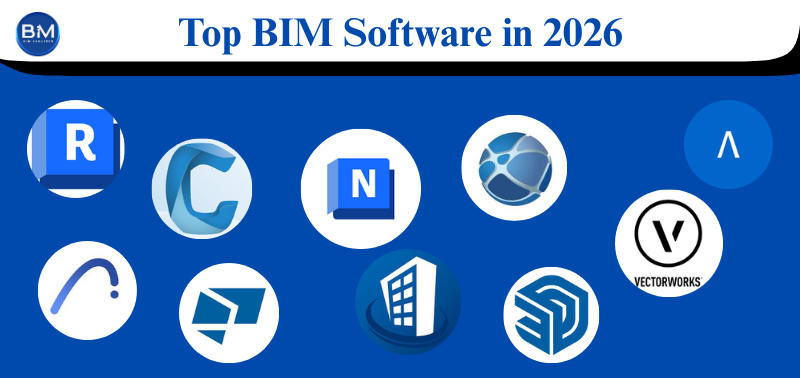
Choosing BIM software is not just about popularity. It’s about what your team needs today: modeling, coordination, clash checks, collaboration, drawings, and clean handover. The best BIM software for an architect can be a bad fit for a steel fabricator. And the best tool for coordination may be useless for modeling.
This guide covers the most searched BIM software tools used by real project teams. For each one, you’ll get a short, simple explanation in a paragraph, then clear pros and cons in key points.
1) Autodesk Revit (Most common BIM modeling software for buildings)
Revit is the first name many people think of when they say BIM modeling software. Architects, structural teams, and MEP teams use it for building models, drawings, schedules, and updates from one central model. It’s powerful, but you need standards and a trained team to get real value from it.
Pros
- Strong for modeling + drawings in one workflow
- Large user base and lots of learning resources
- Works well with many other BIM tools
Cons
- Can feel slow on big projects without good model control
- Learning curve is real (especially for MEP)
- Licensing cost can be heavy for small teams
2) Autodesk Navisworks Manage (Classic BIM coordination software)
Navisworks is used mainly for coordination. Teams bring models together, run clash tests, review issues, and prepare coordination reports. It’s not for modeling—think of it as a “model review + clash room” tool.
Pros
- Great for clash detection and coordination reviews
- Handles large federated models well
- Useful in coordination meetings with clear viewpoints
Cons
- You can’t properly edit models inside it
- Reports and workflows can feel old-school
- Quality depends on how clean the exported models are
3) Autodesk Construction Cloud (ACC) / BIM 360 (BIM platforms for teams)
ACC and BIM 360 are BIM platforms used for sharing files, tracking issues, controlling versions, and managing project communication. If your project needs one place for documents and model reviews, these platforms can help—especially for larger teams.
Pros
- Strong document control and cloud collaboration
- Good issue tracking and approval workflows
- Helpful for multi-company coordination
Cons
- Setup can get confusing (permissions, folders, roles)
- Costs can rise as users/modules grow
- Works best when teams follow the same process
4) Graphisoft Archicad (Fast BIM software for architects)
Archicad is popular with architecture teams that want smooth design workflows and clean output. It’s often praised for speed and usability. If your main work is architectural design and documentation, it can be a strong choice.
Pros
- Smooth for architectural design work
- Good documentation and presentation workflow
- Strong teamwork features
Cons
- Some MEP/structural workflows may need extra tools
- IFC workflows require discipline (or things break)
- Hiring experienced users may be harder in some regions
5) Tekla Structures (Best for steel and rebar detailing)
Tekla is widely used in fabrication-level structural work. If you need accurate detailing for steel and rebar, plus shop drawings and constructible output, Tekla is one of the strongest BIM software programs for that job.
Pros
- Excellent for steel connections, rebar, and detailing
- Strong shop drawing and fabrication output
- Built for constructability-focused teams
Cons
- Too heavy if you only need basic building modeling
- More specialist skills are required
- Can be expensive for small firms
6) Bentley OpenBuildings Designer (Strong for complex buildings)
Bentley tools are common on large infrastructure and facility projects. OpenBuildings Designer supports complex building workflows, especially when the client environment is already Bentley-based.
Pros
- Handles large, complex projects well
- Good for enterprise and infrastructure-linked workflows
- Strong integration in Bentley environments
Cons
- Learning curve is not beginner-friendly
- Smaller user pool compared to Autodesk in many markets
- Best value shows when the whole project is Bentley-driven
7) Solibri Office (Model checking and quality control)
Solibri is not for modeling. It’s for checking models. Many teams use it to validate IFC files, enforce rules, and catch problems before they reach the site. It’s a serious tool when quality and compliance matter.
Pros
- Powerful rule-based model checking
- Strong for IFC review and QA
- Helps enforce project standards
Cons
- Not an authoring tool
- Takes time to set up rules properly
- Can feel complex for smaller teams
8) BIMcollab (Simple issue tracking for coordination)
BIMcollab focuses on issues and coordination workflows. It’s popular for openBIM projects using IFC and BCF. If you want clear issue tracking across different authoring tools, it’s a practical option.
Pros
- Clean issue management across teams
- Works well with IFC/BCF coordination
- Lightweight and easy to adopt
Cons
- Needs team discipline (or issues become messy fast)
- Not a full document management system by itself
- May require integrations for larger projects
9) Trimble SketchUp (Simple early design tool, not full BIM)
SketchUp is one of the most searched tools in the AEC world. It’s fast for early design and visuals. But by itself, it is not full BIM software. It becomes more useful when paired with proper workflows and downstream BIM tools.
Pros
- Very fast for concept and massing
- Easy to learn and quick to present to clients
- Huge library of plugins and content
Cons
- Not true BIM modeling out of the box
- Documentation and data output are limited
- Coordination needs careful exporting
10) Vectorworks Architect (Flexible design + documentation)
Vectorworks is widely used by design studios that want flexible modeling and strong drawings. It can support BIM-style workflows, especially for architectural-focused teams.
Pros
- Good balance of design freedom + documentation
- Useful for many architecture studio workflows
- Strong presentation tools
Cons
- IFC and coordination need careful setup
- Smaller talent pool depending on location
- Not always ideal for heavy MEP coordination needs
11) Allplan (Solid for architecture and engineering in many regions)
Allplan is a mature tool used in architecture and engineering workflows. It’s often chosen where Nemetschek tools are common and teams want strong detailing with structured outputs.
Pros
- Strong detailing and drawing output
- Works well in structured engineering workflows
- Solid openBIM support when done right
Cons
- Hiring users may be harder in some markets
- Setup and templates matter a lot
- Not as universally adopted as Revit
12) Autodesk Civil 3D + InfraWorks (Infrastructure-focused BIM tools)
These are not building authoring tools like Revit, but they are heavily used and searched for infrastructure work. Civil 3D helps with corridors, surfaces, alignments, and utilities. InfraWorks is often used for early planning and visuals.
Pros
- Strong for roads, terrain, and civil geometry
- Useful for planning, visualization, and optioneering
- Fits well in civil/infrastructure project workflows
Cons
- Not meant for full building BIM authoring
- Coordination with building models needs planning
- Standards and exports must be managed carefully
Quick way to pick the right tool
If you’re confused, use this simple rule:
- Need authoring + drawings? Pick Revit or Archicad (mainstream building workflows).
- Need clash detection? Pick Navisworks (classic BIM coordination software) or Solibri (model checking).
- Need collaboration and tracking? Use ACC/BIM 360 or BIMcollab (strong BIM platforms).
- Need steel/rebar detailing? Pick Tekla.
- Need early design fast? Use SketchUp (then move into BIM).
Final thought
In 2026, the smartest BIM choice isn’t “the most famous software” — it’s the one that fits your workflow and your people. Revit or Archicad can be great for authoring and drawings, but they won’t replace coordination tools like Navisworks or QA tools like Solibri, and cloud platforms like ACC/BIM 360 or issue tools like BIMcollab only work when teams follow one clear process. Every option here has trade-offs: cost, learning curve, talent availability, IFC discipline, and setup effort. So pick based on your project type (building, steel, infrastructure), the level of detail you must deliver, and how your team collaborates day to day. When you match the right tools with good standards, you reduce clashes, speed up documentation, and avoid expensive rework on site.